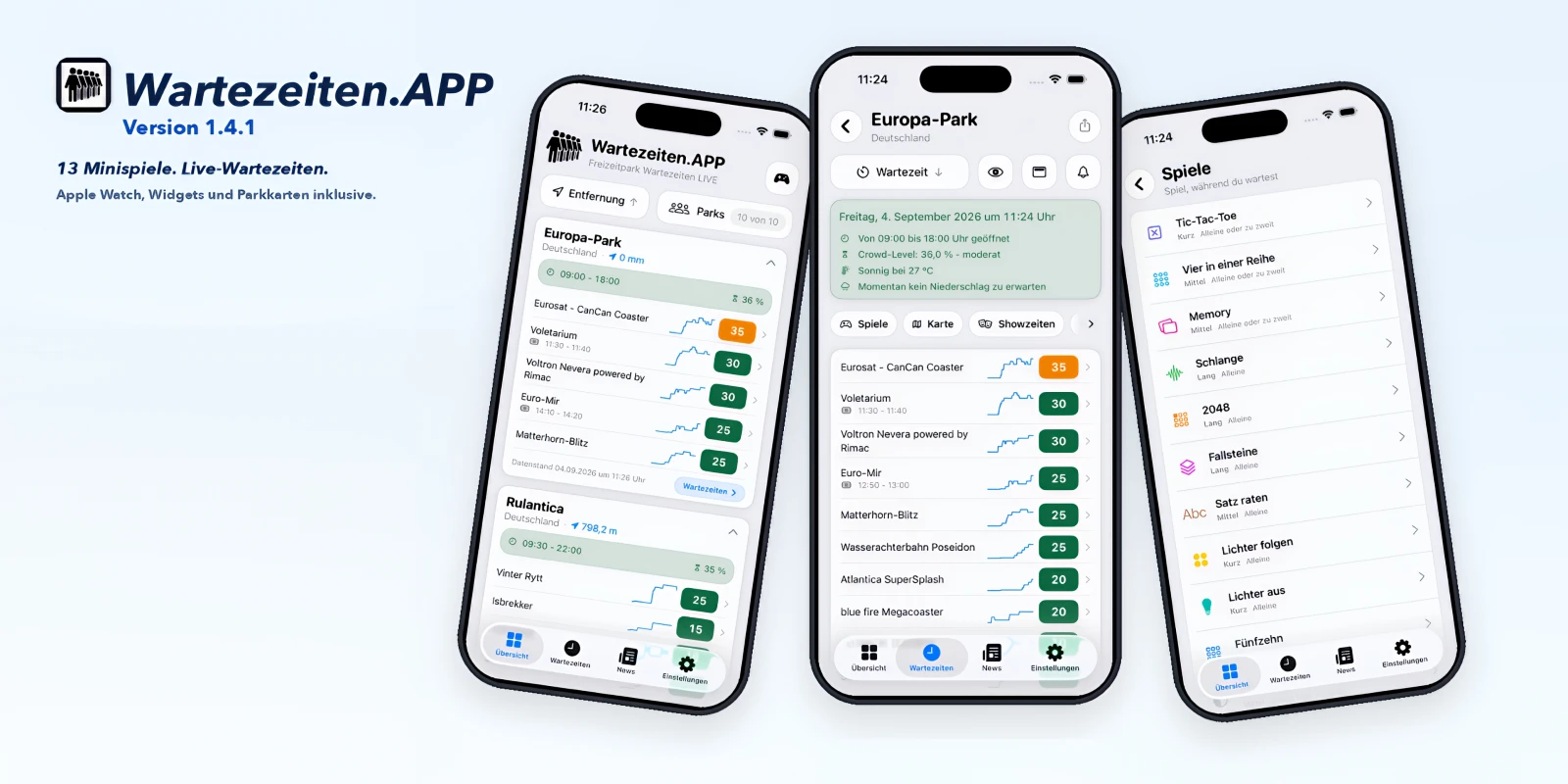
Two months after launch, Wartezeiten.APP is on version 1.4.1. 16 store updates sit in between. For the next park day that mostly means this: you can share wait times, the Apple Watch keeps up, live numbers stay put when the signal dies, and 13 offline mini-games wait in the queue with you. The app did not switch jobs. Less guesswork before the gates, less guesswork once you are inside.
It arrived in the App Store at the end of June 2026 as a native iOS app with Apple Watch, built for iOS 26. Live wait times, crowd calendar, park maps, smart alerts, seven languages. That was the start. Version 1.4.1 is the first major marker since. Same app, same park day, just clearer, more reliable and more complete than right after launch.
The basic idea has not moved. You go with family or friends and you want to know what you are walking into. The app bundles live wait times, park status, weather, shows, park maps, statistics and alerts for more than 40 theme parks worldwide, including Europa-Park, Phantasialand, Heide Park, Movie Park Germany, LEGOLAND and many more. Inside the park, every call matters. Current waits, opening hours, statuses such as closed, under maintenance, paused for weather or Virtual Line only, plus distance and crowd level. Favorites, filters, sorting and hiding the rides you do not care about help you see your visit, not the whole park database.
Before the day, the crowd calendar and historical statistics still do the planning. Which days look busier, when waits usually climb, which attractions get slammed at certain hours. Averages by minute, hour, day, weekday, month, year and attraction, plus weather, precipitation, events and opening hours where the data exists. Alerts stay personal. Before park opening, on wait-time drops, status changes, crowd, weather, precipitation, Virtual Line, park news or show reminders, per park and per attraction.
What showed up after launch does not start with the games. It starts with the park day.
Since version 1.3.0 you share current wait times straight from the park page. A wait-times card, text and a link, shaped for Mail, Messages, WhatsApp and social apps. News articles take the same path, from inside the piece. Getting from the overview into a park is shorter now. No extra loop through the full park list, and Back drops you in the overview again. The wait-times list remembers where you scrolled when you come back from a park. A second tap on the tab more reliably jumps to the top. Duck into another app for a second and an open park detail stays open. You are not dumped on the home page.
Live still works when the network does not. The app updates the screen you are actually looking at, not everything in the background at once. Timeouts and server errors no longer pretend to be "fresh." Open or closed status lines up more cleanly between iPhone and Apple Watch. Weak or dropped reception leaves the last visible values on screen, not empty lists. When the network comes back, overview and wait times catch up immediately. The visible rhythm stays short. Push categories for wait times and Virtual Line stay on even if you deselect the last attraction in the selection.
On the wrist the Watch app still shows parks, favorites, wait times and showtimes. New since the 1.3 updates, complications can load the park catalog without opening the Watch app first. Park Radar and attraction complications keep updating even when a different park is open in the Watch app. Sync with the iPhone is steadier. The Watch app is closed less often in the background while it is pulling data. iOS widgets keep park status and selected attractions on the Home Screen.
Attractions still sit on the park map with wait time or status. Where parks send the data, layers stay for shows, dining and the EP-Express. Destinations hand off to Apple Maps. Since later updates your location follows on the map as long as the map is actually open. Before, the pin often stuck at the first fix. Location updates run only when the map is visible and the tab is active. If the EP-Express position might be delayed, that is easier to see.
Overview, wait times, dining, crowd calendar and statistics scroll and draw more smoothly, even with long lists and charts loaded in. Distances and sparklines are prepared up front instead of being recalculated in every row. The park map moves more calmly, especially during camera travel. Live updates in park detail run only while that detail is actually in front. VoiceOver labels for status, wait times and park details are clearer. Large system type, Dynamic Type, stays more readable. On the park page the feature bar with games, map, shows, dining, crowd calendar, statistics and more puts arrows at the edge as soon as more items sit left or right. Tap to scroll further. Swipe still works.
In the queue, 13 offline mini-games. That is the extra in version 1.4, not the point of the app. Between rides they are ready, no extra tab, no internet. You get in through the games button at the top of the overview or through Games in the bar on the park page. First launch gets a short guide, then help. Under Settings you can hide the whole set in View.
Board games run solo against the computer or two-player on the same iPhone: Tic-Tac-Toe, Connect Four, Reversi, Memory with park symbols. Arcade has Snake with swipe, three lives, walls and extra stars, plus 2048, still playable after 2048, and falling blocks to move, rotate and clear full rows. Puzzles cover Follow the Lights, Lights Out on a 5×5 grid, Fifteen, Flood and Number Place, each game a new puzzle with the digits 1 through 9. Guess the Sentence uses real park sentences in the app language. Wheel of Fortune has coins, consonants, vowels you can buy, and solve. On smaller iPhones the boards stay usable. Light and dark mode read cleaner. A swipe steers the game, not the page.
Version 1.4.1 mostly tidies the look you use to read the park day. Wait-time parks, dining and the games hub sit as grouped lists instead of a pile of single cards. In light mode the same light gray sits behind the cards as on the other screens. That one white wait-times view next to gray tabs is gone. Liquid Glass stays on the tab bar and controls. The content itself stays opaque and readable. Overview, park list and park detail scroll more calmly.
Depending on the park you still get news, showtimes, dining including menus, opening status, Mobile Ordering and price trends. Dark Mode, search, filters, flexible sorting, favorites and the seven app languages are unchanged.
The business model did not move. The app is funded by ads. Every function works without a subscription. Want it ad-free? Monthly subscription via Apple In-App Purchase. While it is active, ads and the related ad SDKs stay off. After it lapses, ads come back reliably. Banners behave better in daily use. After a tab switch, backgrounding and empty inventory you get fewer empty strips and fewer surprise full-screen interruptions after a short system overlay. An Android app is still not planned. Focus stays the native iOS app in Swift and SwiftUI on iOS 26, and the website.
Want the next park day with a clearer picture? Grab version 1.4.1 in the App Store as soon as Apple releases it.
Go to the App Store: apps.apple.com/us/
Oops! Your browser or network is blocking our ads.
Please deactivate your adblocker so that we can keep the service running. Alternatively, we appreciate your support via PayPal, Ko-fi, LiberaPay or by shopping through our Amazon affiliate link.
Thank you for your support!
Please deactivate your adblocker so that we can keep the service running. Alternatively, we appreciate your support via PayPal, Ko-fi, LiberaPay or by shopping through our Amazon affiliate link.
Thank you for your support!